8 Ways to Get More Learners to Share Their Credentials Online

When you issue a credential, you're giving your learners a symbol of achievement. But a certificate sitting in an email inbox doesn't build your program's visibility. What does? When learners share their credentials proudly with their networks.
Credential sharing isn't just good for your brand. It benefits your learners too. A shared credential signals to employers, peers, and potential collaborators that they've mastered a real skill. It strengthens their professional identity and opens doors. In fact, micro-credentials are reshaping how employers evaluate job candidates, with many now valuing demonstrated skills as much as traditional degrees.
The challenge is getting learners to take that step. Sharing requires a reason beyond receiving the credential itself. Here are 8 proven ways to increase sharing rates and turn your learners into ambassadors for your program.
1. Make the Credential Visually Desirable
Your certificate and badge need to stop people in their tracks. Beautiful design isn't a luxury; it's the foundation for sharing.
Learners won't share something they're embarrassed to associate with their name. Design credentials with:
- Strong, modern visuals that reflect your brand's quality
- Animated badges that feel premium and current
- Details that make people pause and admire the achievement
Example: A platform certification with a metallic badge that animates when clicked will get more LinkedIn additions than a basic PDF certificate. The visual appeal alone increases the likelihood someone will want to show it off. For design inspiration, check out Wauld's guide to designing certificates that perform.
2. Show Them What They're Getting
Most learners don't realize how good their credential looks until they receive it. By then, the excitement may have passed. Close this gap by showing them exactly what they'll get.
Before issuance, show previews of:
- The finished certificate design
- The digital badge they'll receive
- Their public credential page
Example: Include a preview link in your enrollment email: "Here's what your certificate will look like when you complete the course." Seeing themselves on a professional credential page makes the achievement feel real before they even finish. Wauld's certificate maker lets you create and preview beautiful credentials instantly. For inspiration, explore modern certificate templates designed to inspire sharing.
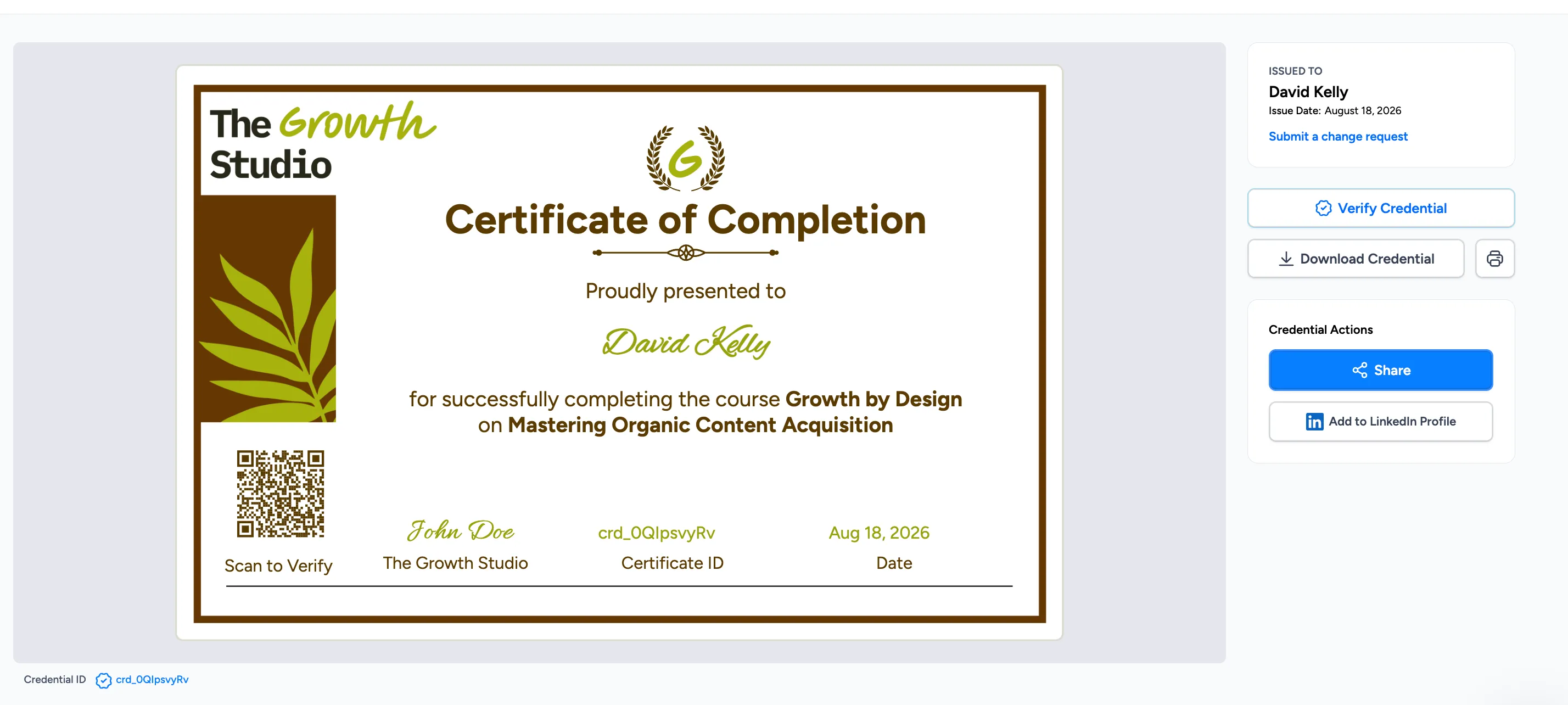
Wauld's credential portal displays the certificate and provides easy one-click sharing options, including "Add to LinkedIn Profile" for seamless credential distribution.
3. Tell Them Why They Should Share It
"Share your credential" is a weak ask. Instead, explain what sharing does for them.
Help learners connect credential sharing to their goals with concrete reasons and data:
- "Add this to your LinkedIn Licenses & Certifications to show employers the skills you've gained. AI and Machine Learning are among the most in-demand professions by 2029, and LinkedIn gets 1.5 million visits a month from people searching for these skills"
- "Celebrate this win with your professional network and build your personal brand"
- "Let your audience know you've mastered this skill, making you visible to hiring managers and peers"
Example: After certification, send an email that says: "Add this credential to your LinkedIn profile under Licenses & Certifications. With 1.5 million visits a month on LinkedIn from people searching for [skill], hiring managers are actively looking for professionals like you. Here's how to add it in two minutes [link]." Specific guidance backed by data beats vague encouragement.
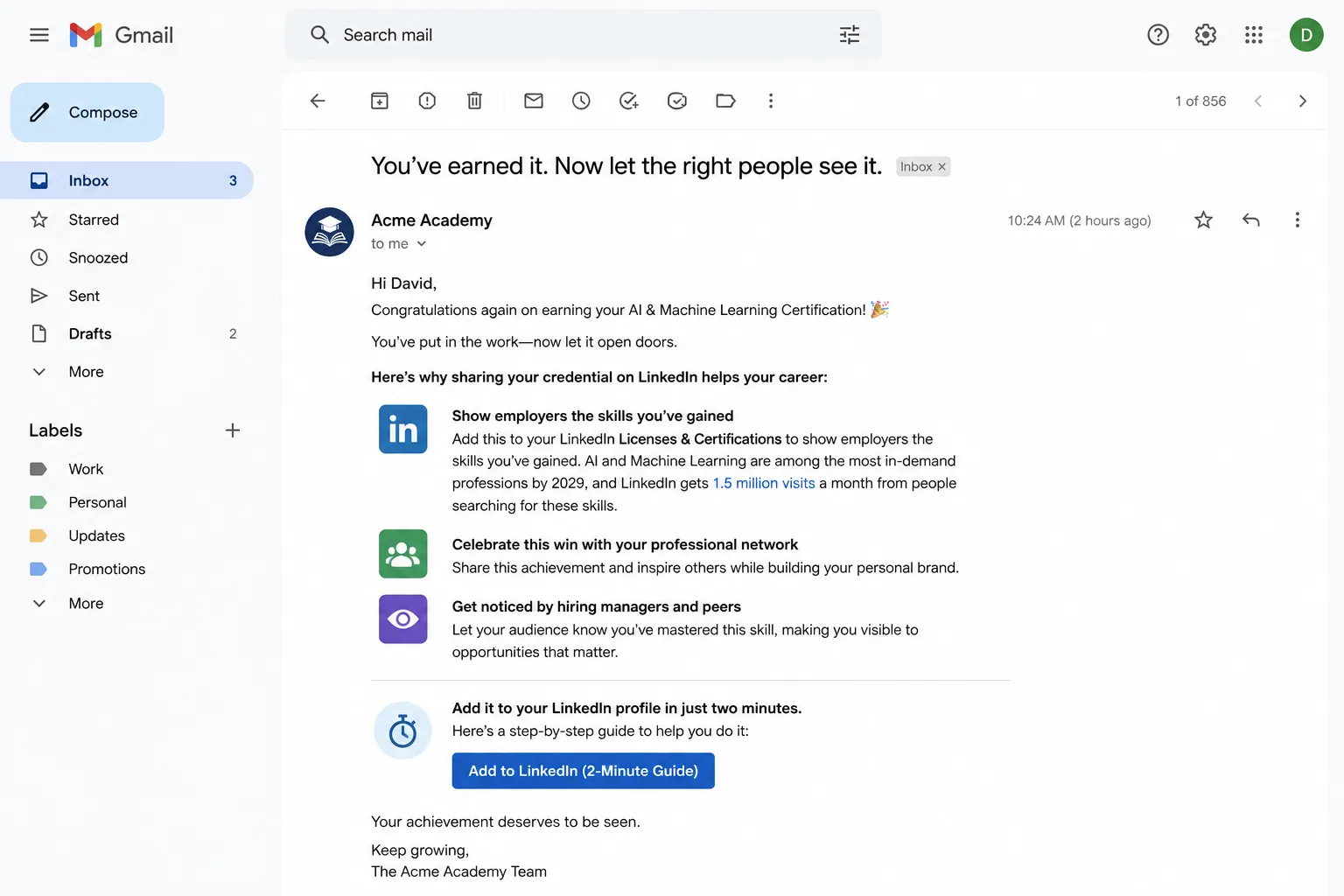
An email from Acme Academy explains why sharing credentials on LinkedIn matters: showing employers skills, celebrating achievements, and getting noticed by hiring managers.
4. Give Them One Clear Sharing Action
When you ask learners to do multiple things, none of them happen. Pick one platform where your audience is most active.
- For a professional audience: Ask them to add it to LinkedIn under Licenses & Certifications
- For a community-focused program: Ask them to share as a social media post
- For a niche field: Ask them to add it to their professional portfolio
Example: Instead of saying "Share your credential on LinkedIn, Twitter, or your website," just say: "Add this to your LinkedIn profile. Here's how [link to instructions]." One clear instruction is more likely to get done than three options.
5. Send a Nudge After a Week
People get busy. They don't forget your credential is valuable; they just forget to share it. A single reminder one week after issuance can significantly boost sharing rates. This is one of the most effective re-engagement strategies to keep learners active in your program.
The nudge should:
- Be short and friendly in tone
- Have one clear call to action
- Remind them why sharing matters
Example: "A week ago, you earned a credential in Digital Marketing. Congratulations. Now it's time to let your network know. Add it to your LinkedIn profile here [link]."
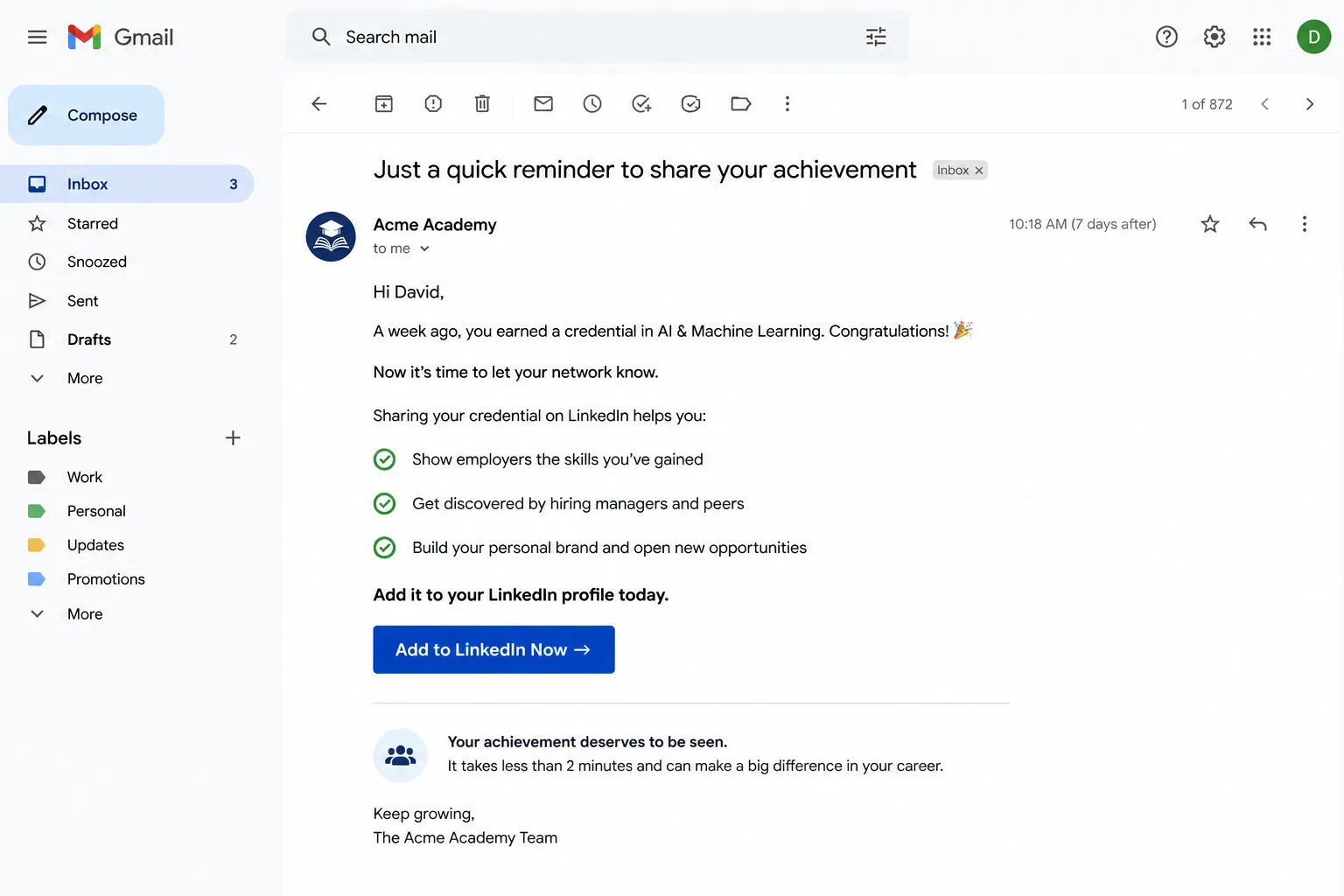
A follow-up nudge email sent one week after credential issuance reminds learners to share their achievement and highlights the benefits of adding it to their LinkedIn profile.
6. Give Them a Reason to Share Beyond Money
Financial incentives can work, but they often feel transactional. Instead, offer benefits that make sharing feel like another perk of earning the credential itself:
- Access to an exclusive merchandise store with branded gear
- Limited-edition badges or collectibles they can earn
- Early access to a new course, event, or community
- An invitation to an exclusive cohort or office hours session
- Recognition on an honour roll or featured achievers page
- Entry into a prize draw for a valuable reward
- Special recognition from leadership or the organization
Example: "The first 100 learners to share their credential will get early access to our advanced certification course" makes sharing feel like it unlocks something special, not like they're doing you a favour. Learn more about employee recognition strategies that drive engagement.
7. Make the Message Part of the Experience
The email announcing their credential matters as much as the design itself. Words create emotion and motivation.
Instead of: "Your certificate is ready. Share it here."
Try: "You've officially mastered [skill]. This credential proves your expertise to employers and your network. It's time to let them know. Add it to your LinkedIn profile to show the world what you've accomplished."
The second message makes the learner feel proud and gives them a clear reason to act.
8. Acknowledge Sharing with Personal Recognition
When a learner shares their credential on LinkedIn or social media, have your leadership team or social media team comment on their post. A genuine, personal comment from your organization travels further than any email.
This does three things:
- Shows learners that their achievement is noticed and valued
- Builds community and strengthens their connection to your brand
- Encourages other learners to share, knowing they'll receive recognition
Example: When someone tags your organization or posts their credential, leave a comment like: "Congratulations on earning your certification in Digital Marketing! We're proud to have worked with you. Your dedication to mastering these skills is exactly what the industry needs right now. Great work!"
This takes 30 seconds but creates a memorable moment for the learner. They feel celebrated, and their network sees your team genuinely cares about learner success. That authenticity is contagious and often inspires other credential holders to share too.
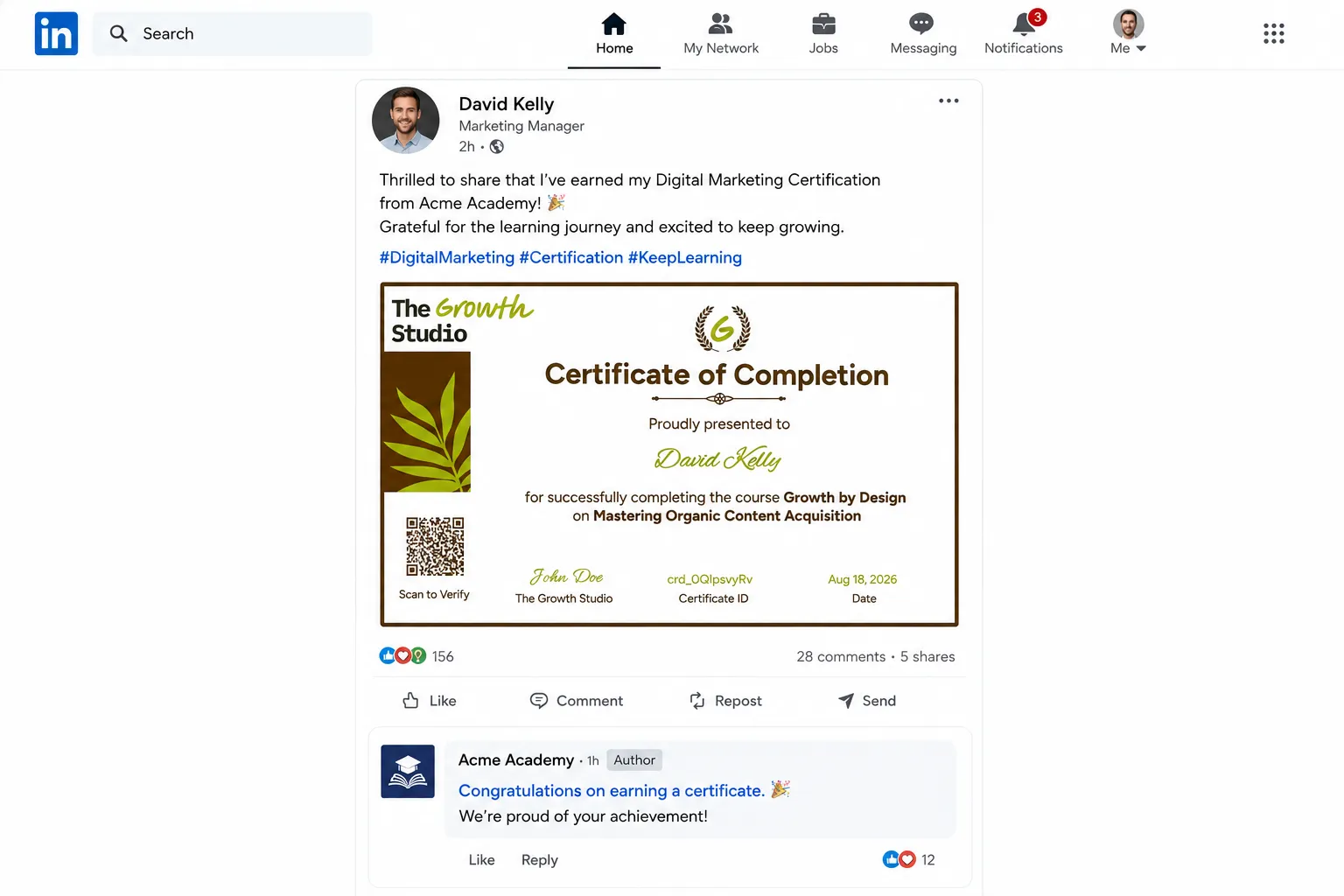
When a learner shares their credential, an organization comment offering genuine appreciation and congratulations creates a memorable moment and encourages others to share.
Sharing credentials is one of the most powerful ways to build your program's visibility and help your learners advance their careers. By making credentials desirable, giving clear reasons to share, and removing friction from the process, you create a cycle where learners naturally become ambassadors for your program.
Research shows that employees with verified credentials report higher job security and confidence. The best part? As more learners share their credentials, your brand gains trust and visibility. Everyone wins.
Ready to get started? Explore Wauld's credential platform to create beautiful, shareable certificates and badges that inspire your learners to spread the word. Or read our complete guide to certificate makers to learn how Wauld compares to other solutions.
FAQs on Credential Sharing
How long does it take for a learner to add their credential to LinkedIn?
Adding a credential to LinkedIn takes about 2 to 3 minutes. Your learners can search for your credential issuer in the Licenses & Certifications section, add a start date and notes about what they learned, and publish. Include step-by-step instructions in your post-issuance email to make it even easier.
What if learners are hesitant to share because they're worried about privacy?
Address privacy concerns head-on. Explain that sharing a credential on LinkedIn or posting it on social media is optional and completely within their control. They choose what to share and when. Emphasize that credentials are professional achievements meant to be celebrated, and that privacy settings on social platforms give them control over who sees their posts.
Should we incentivize sharing with prizes or money?
Incentives can help, but they work best when they feel like a bonus rather than a bribe. Non-monetary rewards like early access to new courses, exclusive community membership, or public recognition on an honour roll tend to create more sustainable sharing habits. Learners who share because they want recognition are likely to keep promoting themselves long-term.
How do we track how many learners are sharing their credentials?
Most credentialing platforms provide sharing analytics through a dashboard. You can see how many credential holders have clicked the share button, how many have visited the public credential page, and sometimes even LinkedIn clicks if that integration exists. These metrics help you understand which incentives and messaging work best, so you can refine your approach over time.
Ready to issue your first credential?
Design, issue, and verify certificates and badges in minutes — free for up to 300 credentials, no credit card required.